%20(2)%201.png?width=300&height=60&name=Untitled%20(500%20x%20100%20px)%20(2)%201.png)
1. When you can use the free ATS
You can use the free s1jobs ATS for applications that:
-
Are submitted directly via s1jobs
-
Use the Apply directly on site (Apply by email) options
You cannot use the free ATS to manage applications that are sent to an external careers site or ATS via a separate URL.
2. Actions for a single candidate
From your applicants list, select a candidate’s name to open their details and actions on the right hand side.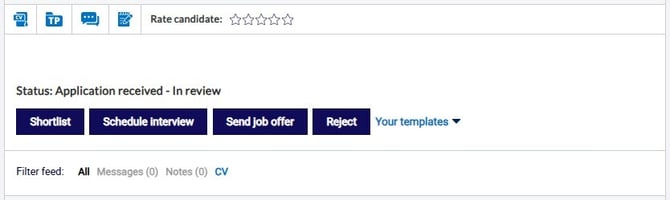
You can:
-
Download CV
-
View or save the candidate’s CV.
-
-
Add to talent pool
-
Save strong candidates to a talent pool for future roles.
-
-
Message candidate
-
Use the message icon to send an email to the candidate from within the ATS.
-
-
Add recruiter notes
-
Record private notes about the candidate or the stage they are at in your process.
-
-
Rate candidate (1 to 5 stars)
-
Score candidates and sort your list by rating to prioritise the strongest matches.
-
-
Shortlist candidate
-
Mark candidates who are suitable to move forward in the process.
-
-
Schedule interview
-
Email candidates to arrange interviews and confirm details.
-
-
Send job offer
-
Email candidates via the ATS to offer a role when you are ready.
-
-
Reject candidate
-
Send a rejection email directly from the ATS to keep candidates informed.
-
3. View candidate history and talent pool status
From a candidate’s profile you can see:
-
Previous applications
-
Other jobs they have applied for with your company on s1jobs.
-
-
Talent pool membership
-
Any talent pools the candidate has already been added to.
-
This helps you understand their history with your organisation and avoid duplicate outreach.
4. Page actions for multiple candidates
You can perform actions on several candidates at once.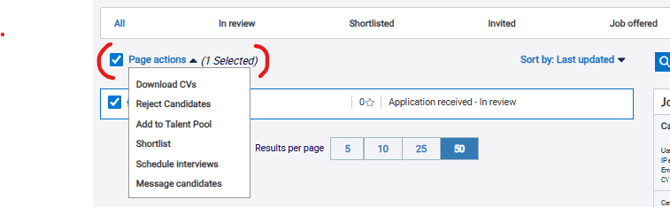
To use Page actions:
-
In your applicants list, tick the candidates you want to update.
-
Select the Page actions button at the top of the page.
-
Choose from:
-
Download CVs
-
Reject candidates
-
Add to talent pool
-
Shortlist
-
Schedule interviews
-
Message candidates
-
Bulk actions save time and help you move groups of candidates through your process consistently.
5. Filter, Sort & Find Candidates
You can filter candidates by clicking on the applicant stages and ratings at the top of the page. Use this to quickly navigate to candidates.
There is also a filter to hide candidates who declare their location is outside the UK.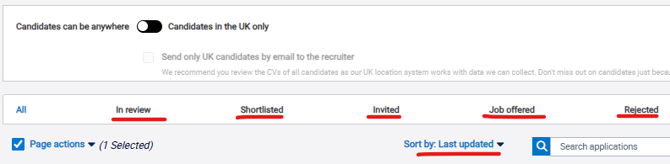
You can also sort candidates by:
- Last updated
- Date
- Name
- Rating
To find a candidate by name you can enter the candidate name or surname in the "search applications" box.
5. Need help with the s1jobs ATS?
If you need assistance using the ATS:
-
Call 0141 302 7510, or
A member of the team will be happy to help.