%20(2)%201.png?width=300&height=60&name=Untitled%20(500%20x%20100%20px)%20(2)%201.png)
Overview
You can create and send automated follow up messages to candidates who apply for your job postings. This helps you streamline communication, improve candidate experience and request important information as soon as an application is submitted.
What’s New?
Message template builder
You can use a template builder to create and manage automated messages.
The builder includes auto populate fields such as:
-
Candidate name
-
Job title
-
Company name
-
Recruiter name
These fields help you keep your messages personalised and professional.
How It Works
Create and save a Message Template
-
Go to the Template Builder.
-
Enter a clear name for your template so you can recognise it later.
Add your message subject line.
-
Add your message content, for example next steps, contact details or information requests.
-
Insert auto populate fields where you want to personalise the message, for example at the greeting or in the job details.
-
Save your template.
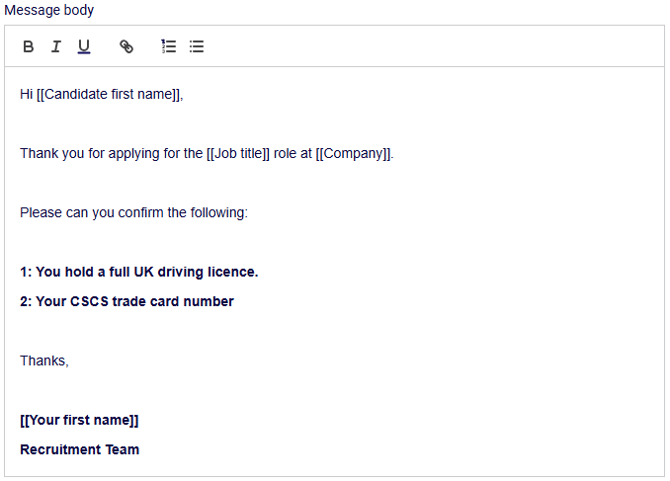
Example opening line:
Hi [[Candidate first name]],
Thank you for applying for the [[Job title]] role at [[Company]].
Enable Automated Sending
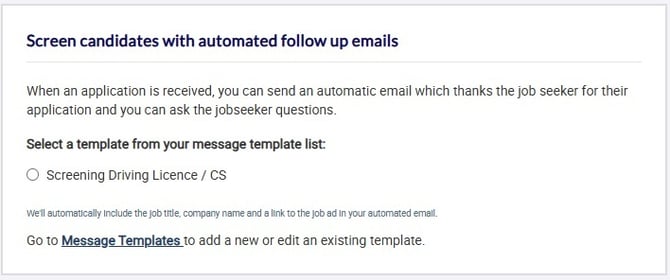
- Post or edit using the job posting form for the role you want to update
- Scroll to the "automated follow up emails" section at the bottom of the form.
- Select the message template you want to use.
- Save or update the job posting.
The selected template will then send automatically after a candidate submits their application.
Use Cases
Candidate Screening
Use automated follow up messages to request extra details you need for shortlisting, for example:
- CSCS card number
- Driving licence number
- Professional body registration or certificate number
- Eligibility to work in the UK
"Please reply to this email with your CSCS card number and expiry date."
You can use automated follow up to confirm Next steps communication
-
Phone number and times to call
-
Link to self schedule an interview
-
Information about documents to bring to interview
-
Expected timeline for feedback
We will review your application and contact you within three working days. If you have any questions, you can reach us on 0131 123 .....
Benefits
- Saves time by automating routine follow ups.
- Ensures candidates receive timely and consistent communication.
- Collects essential screening information without manual chasing.
- Improves candidate experience with clear and prompt updates.